Not every QR code on a table does the same job. A QR menu replaces the paper menu: guests scan and browse, then still flag down a server to order. A QR ordering system lets guests place the order themselves, with the ticket landing on your kitchen display. WowMenu is built as the second kind, and the menu opens in the phone's browser with no app to download.
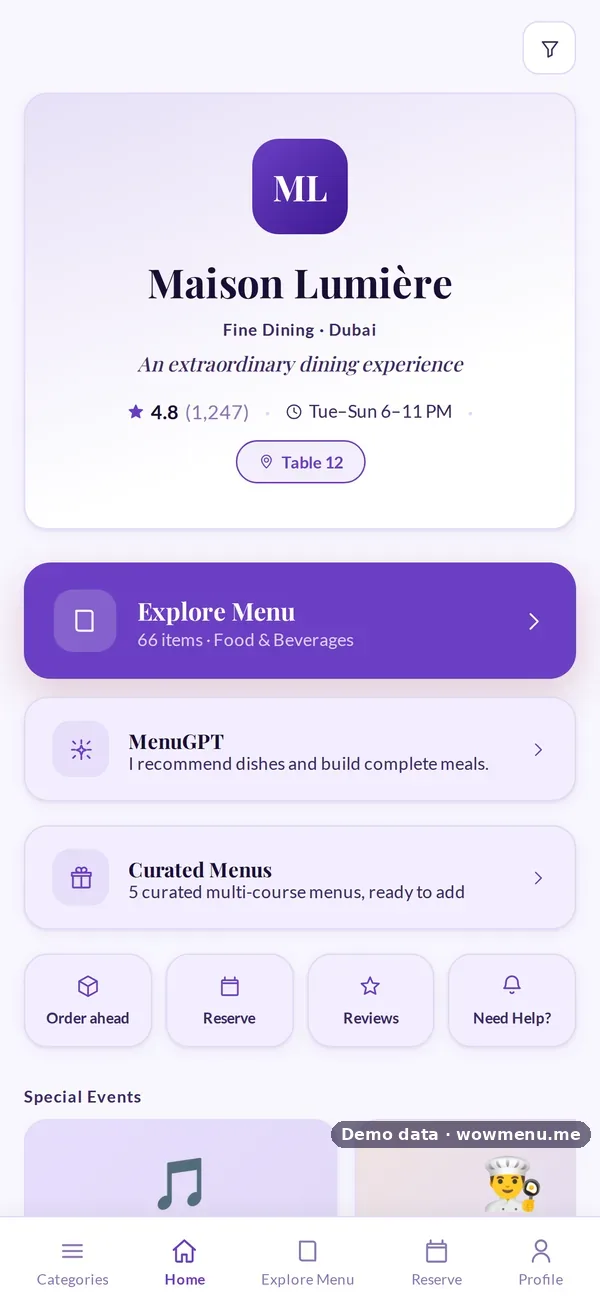
Every table has its own QR code, and there is a main code for the door and a takeaway code, so you always know where an order came from. A venue confirmation such as "Table 12 · Terrace" lets a guest who scanned the wrong table's code catch it before building an order. Hotel accounts show "Room" automatically.
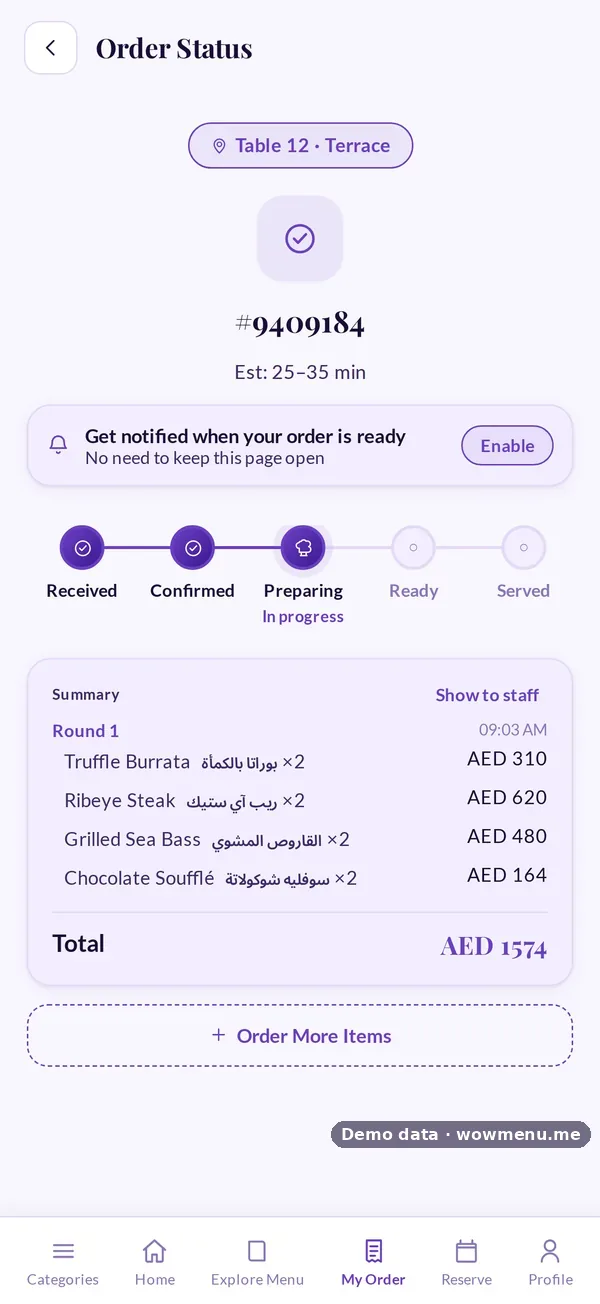
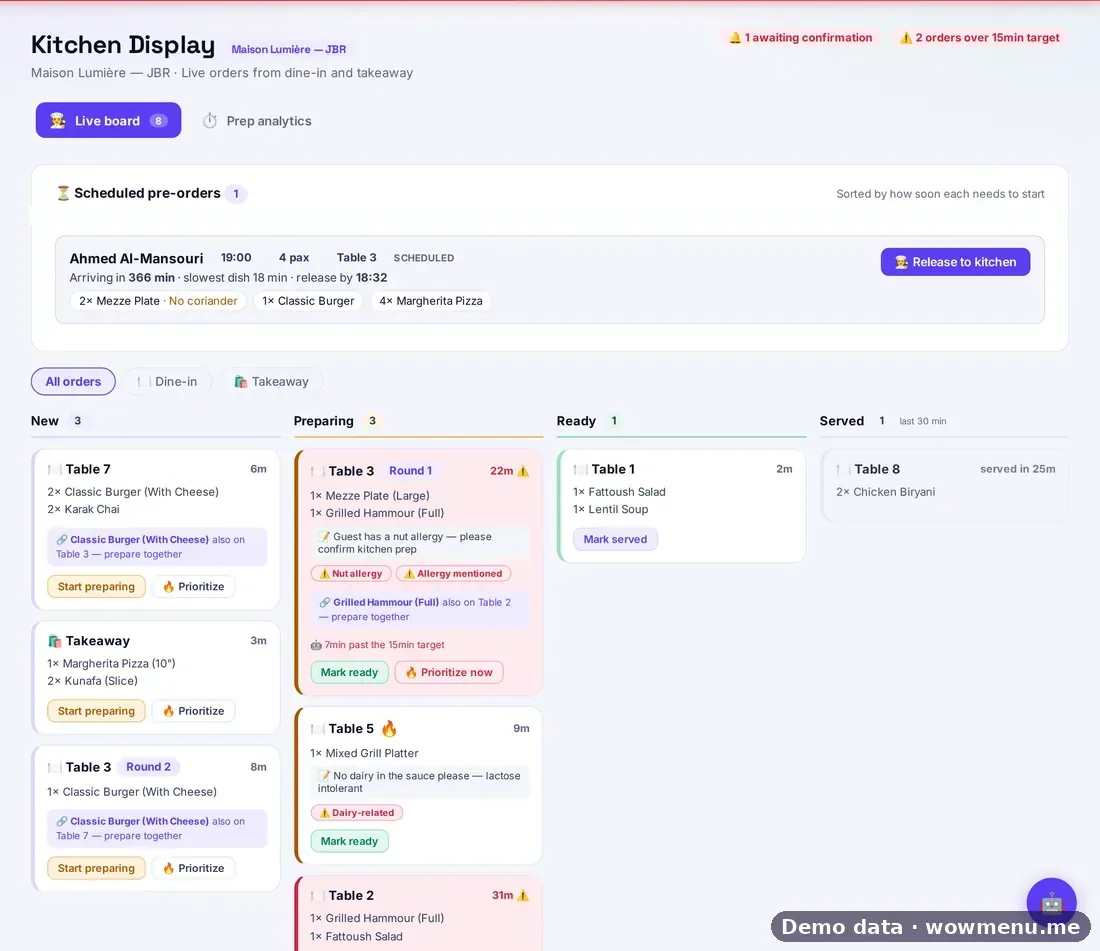
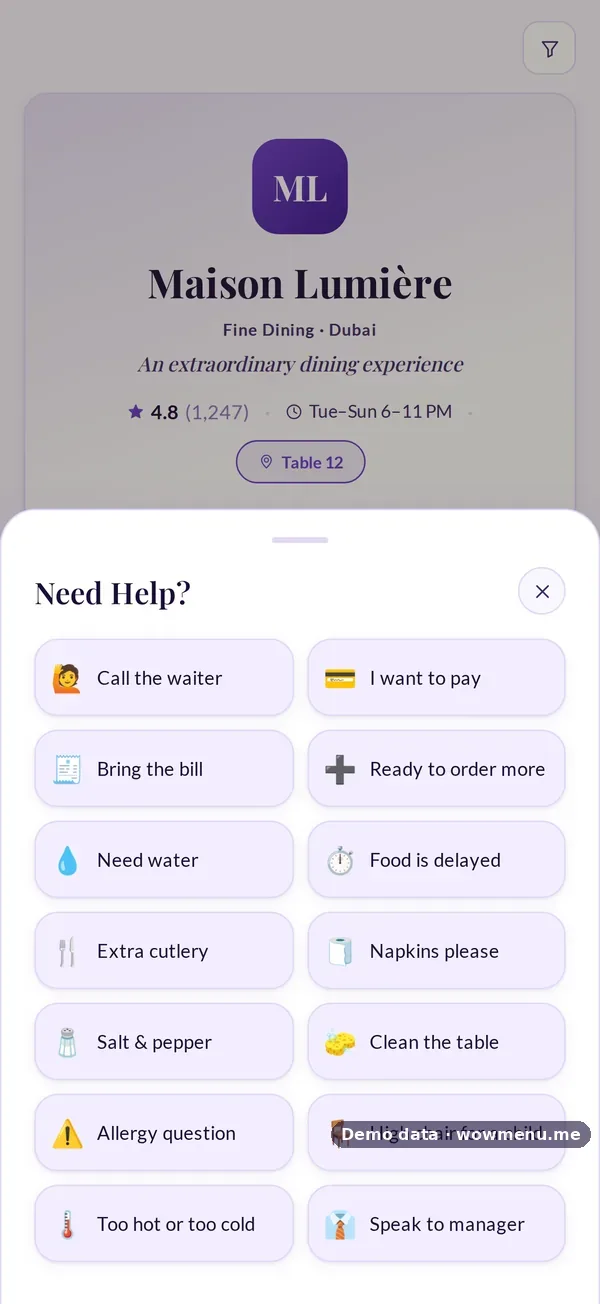
One ordering flow serves every way a guest might order: dine-in with several rounds per visit, grouped on the kitchen board with notes and allergies attached; order ahead for pickup or delivery; and pre-orders attached to a reservation. Guests see their order move from Received to Served, and can send a one-tap request to staff without waving anyone down.
Per-table and takeaway QR codes are included from the Menu plan. Direct kitchen display ordering is included from the Growth plan.
Every QR code knows where the order came from
Print them from the Owner Portal. Each opens the same menu, routed differently.
One per table. Opens the menu tied to that table, with a confirmation such as Table 12 · Terrace, so orders, rounds and requests reach the right place.
For the entrance or window. Guests open the same menu without a table attached to browse, check offers and events, reserve or order ahead.
For the counter or the bag. Takeaway orders arrive on the same kitchen board, kept apart from dine-in.
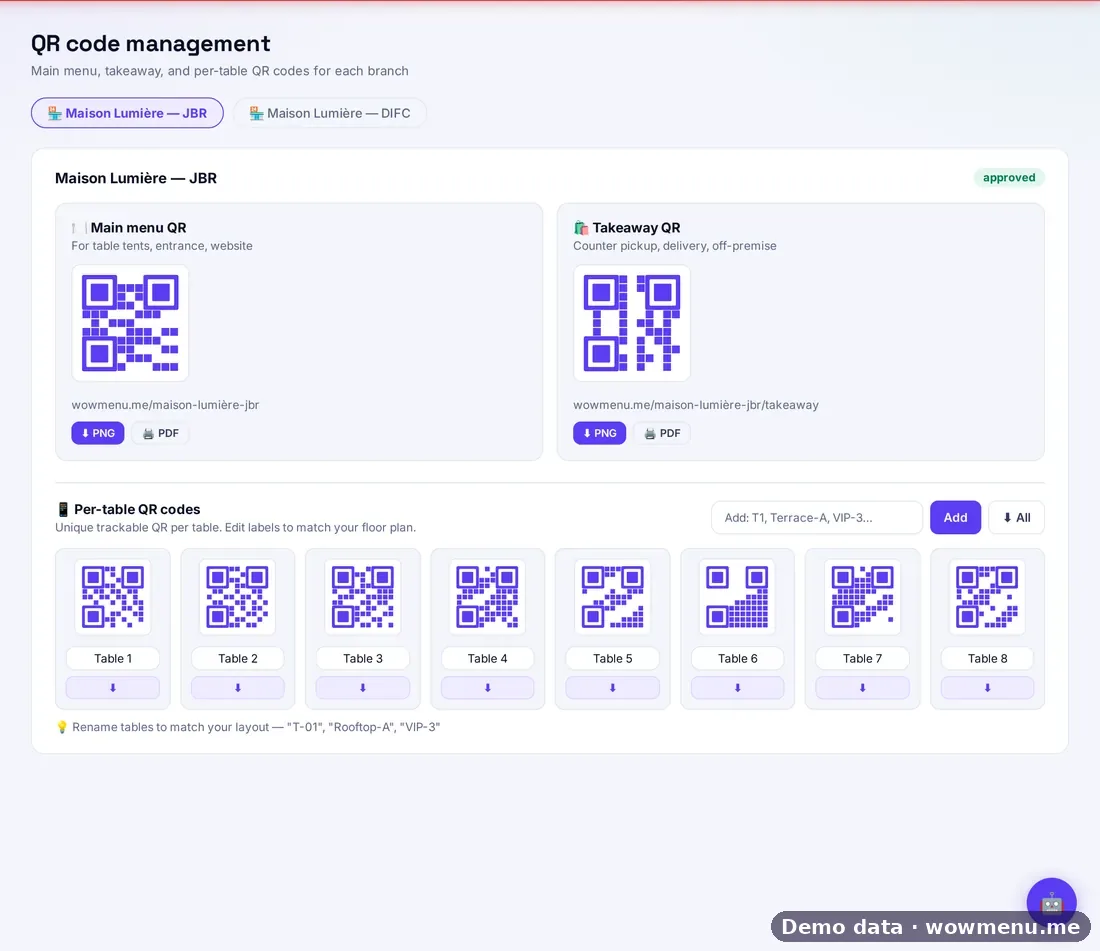
QR codes in the Owner Portal. Demo restaurant.
QR menu or QR ordering system?
| What the guest can do | View-only QR menu | WowMenu QR ordering |
|---|---|---|
| Guests browse the menu | ✓ | ✓ |
| Guests order from their phone | — | ✓ |
| Ticket goes to the kitchen display | — | ✓ |
| Guests pay from their phone | — | ✓ |
| One-tap requests to staff | — | ✓ |
| Knows which table ordered | — | ✓ |
| MenuGPT recommends dishes | — | ✓ |
| App download | None | None |
How it connects
What the owner sets up or sees in the portal, and what the guest sees in the QR menu. Screens are from the demo restaurant, Maison Lumière, with demo data.
Print the table code, and the guest lands on the right table
The owner prints a code per table, plus a main-door and a takeaway code. Scanning opens the menu already tied to that table.
The guest orders, and the kitchen sees the ticket
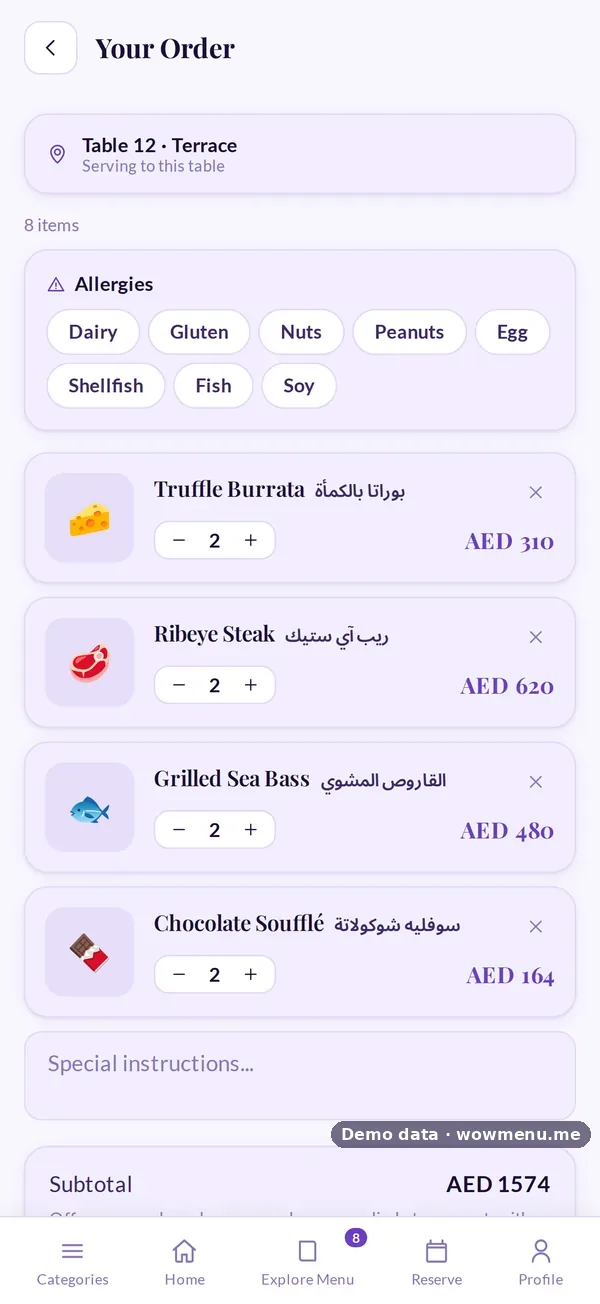
The guest reviews allergies and notes and places the order. The ticket appears on the live kitchen board, and the guest follows its status.
One tap to ask for help, and staff see it at once
Guests send requests such as extra cutlery or the bill. They show up in the call bar on every portal screen.


Key benefits
What QR Ordering System does for your restaurant
A code for every table, the door and takeaway
Per-table codes, a main-door code and a takeaway code, printed from the Owner Portal, so every order is tied to where it came from.
Several rounds, one visit
Guests can order again during the same visit. Rounds are grouped on the kitchen board, with notes and allergies attached to the ticket.
Live status and one-tap requests
Guests follow their order through Received, Confirmed, Preparing, Ready and Served, and can ask for help with one tap.
How it works
Guest scans the QR code
The menu opens in their phone's browser, in your branding and their language, with a venue confirmation so they know they are on the right table.
Browse, customise and add
Guests search and filter by allergen, dietary need or spice level, choose sizes and extras, set quantities and add notes.
Order goes to the kitchen
The structured order, with every modifier as the guest chose it, goes to your kitchen display. Later rounds are grouped with the first.
Track, request and pay
Guests track status from their phone, send one-tap requests, and pay online or at the restaurant when they are ready.
Frequently asked
What is contactless table ordering?
Guests order and pay from their own phone at the table, so nobody has to wait to flag down a server. With WowMenu the order goes straight to your kitchen display and staff can still help at any time.
Is WowMenu a no-app ordering system?
Yes. Guests scan the table's QR code and the menu opens in their phone's browser. There is nothing to download.
What's the difference between a QR menu and a QR ordering system?
A QR menu is view-only: guests scan to see a digital version of the paper menu, then still order through a server. A QR ordering system, like WowMenu's, lets guests place the order themselves from their phone, with the ticket going straight to the kitchen display.
Do guests need to download an app?
No. The whole experience runs in the browser. Guests scan the QR code and the menu opens immediately.
What if a guest scans the wrong table's code?
The menu shows a venue confirmation, for example Table 12 · Terrace, so the guest can catch it before building an order. Hotel accounts show Room instead of Table.
Can guests order again during the same visit?
Yes. Dine-in supports several rounds per visit. They are grouped on the kitchen board, with notes and allergies attached to each ticket.
Can guests tell the kitchen about an allergy?
Guests can add notes and allergies to an order, and they appear on the kitchen ticket. These are prompts for your team and not a guarantee that a dish is allergen-free, so your staff should still confirm.
How do guests pay?
They can pay online by card, Apple Pay or Google Pay, or choose to pay at the restaurant, where staff are notified and a payment reference is captured.